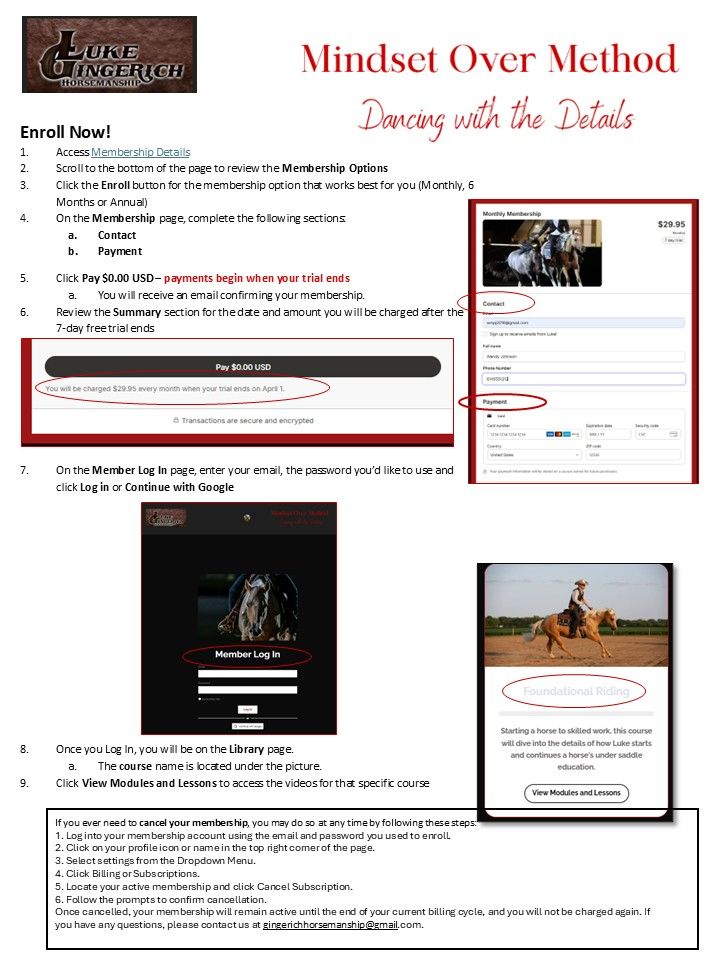
Can I try Luke's new online training program before I enroll?
Yes! If you ever need to cancel your membership, you may do so at any time by following these steps:
1. Log into your membership account using the email and password you used to enroll.
2. Click on your profile icon or name in the top right corner of the page.
3. Select settings from the Dropdown Menu.
4. Click Billing or Subscriptions.
5. Locate your active membership and click Cancel Subscription.
6. Follow the prompts to confirm cancellation.
Once cancelled, your membership will remain active until the end of your current billing cycle, and you will not be charged again.
Can I cancel my membership?
If you ever need to cancel your membership, you may do so at any time. Once cancelled, your membership will remain active until the end of your current billing cycle, and you will not be charged again. To cancel:
1. Log into your membership account using the email and password you used to enroll.
2. Click on your profile icon or name in the top right corner of the page.
3. Select settings from the Dropdown Menu.
4. Click Billing or Subscriptions.
5. Locate your active membership and click Cancel Subscription.
6. Follow the prompts to confirm cancellation.
Join Our Free Trial
Get started today before this once in a lifetime opportunity expires.